
Find it
Surface business information when an employee needs it.

Your employees want to help customers—not spend the call searching for policies, piecing together a previous interaction or writing everything down afterward. ELEVATE AI Agent Assist can bring relevant company knowledge, live conversation context and follow-up support into eligible customer-service calls. CloudBusinessPhone.com helps you determine where this assistance will be useful, configure it for the way your team works and keep the person serving the customer in control.
Explore All AI Call Center Tools →
AI supports the agent. Your employee makes the decisions.
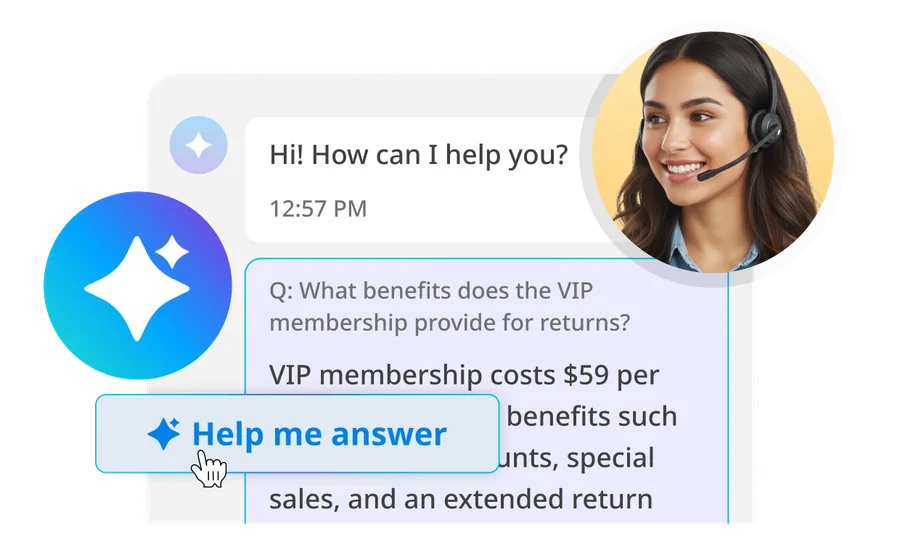
An employee takes a call about a return policy. The answer is documented somewhere—but the customer doesn't want to wait while someone searches through several files. A different caller refers to a conversation from last week, and the current agent needs context before continuing. After a difficult interaction, an employee still has notes to complete before helping the next customer.
These are ordinary service challenges, especially for growing businesses. Better technology should make those moments more manageable—not add another screen for people to learn in the middle of a call.
With the right ELEVATE Contact Center environment, AI Agent Assist helps employees access approved business knowledge and useful conversational context. It can support note-taking and follow-up, while leaving customer service, exception handling and judgment with your team.
Surface business information when an employee needs it.
Review eligible live conversation context and earlier information.
Use an editable recap to support documentation after the call.
Available capabilities depend on the customer's Contact Center edition, AI subscription, eligible queue, permissions and configuration.
The situation: Calls arrive throughout the day, and answers are spread across procedures, pricing sheets, staff knowledge and previous conversations.
What changes: Approved business information can become more accessible to employees while they speak to customers. Human staff remain responsible for explaining, confirming and acting on that information.
Explore Agent Assistance →The situation: New employees are learning, the volume of calls is changing and every service queue has different rules or answers.
What changes: Queue-specific knowledge assistants can help make relevant information easier to retrieve, complementing training and documented escalation procedures.
Discuss Your Service Queues →The situation: Managers want better service consistency and less repetitive work without losing visibility or relying blindly on AI output.
What changes: Transcripts, editable recaps and appropriate live insights can support the staff workflow; separate supervisor and quality-review tools may complement them when licensed.
Review Your Contact Center Options →
A returning customer is connected to an eligible service queue. Where available, the employee can see a summary of a recent prior interaction and begin with a clearer understanding of the issue.

The employee listens to the customer and asks a queue-specific AI knowledge assistant for approved company information. If the relevant live features are provisioned, the employee can refer to an evolving transcript and an indicative sentiment signal. They decide how to respond.

An AI-generated recap may help organize the conversation and possible next steps. The employee checks the content, edits it as needed and completes the appropriate follow-up process.
Illustrative workflow. Features available depend on your ELEVATE Contact Center edition, modules, queues and permissions.
Hover or tap a card to see how it can help.
Challenge: Employees spend time searching for business hours, policy details, product specifications or common procedures while customers wait.
A knowledge assistant configured with approved business content can help staff find relevant information. The employee confirms that the answer fits the actual customer situation before sharing it.
Value: Less interruption in the conversational flow and a more reliable way to work from current, maintained knowledge.
Example: A retail service agent checks a published return policy without leaving the caller waiting through an extended document search.
Challenge: New employees often know how to help customers but haven't memorized every exception, policy or internal process.
AI-enabled knowledge retrieval can complement training with relevant materials during eligible calls.
Value: A more supported onboarding experience, while experienced team members remain available for coaching and exceptions.
Example: A recently hired home-services dispatcher checks the correct information to communicate about a service-window change.
Challenge: A customer calls a second time and has to explain an earlier issue from the beginning.
When caller matching and relevant interaction history are available, a prior-interaction summary can provide starting context for the employee.
Value: A more continuous service experience, with less dependence on the customer to reconstruct previous conversations.
Example: A repair-shop service representative recognizes that a returning caller previously asked about a parts delay. Staff still verify the identity and current facts before discussing sensitive or account-specific information.
Challenge: Employees are trying to listen, ask useful questions and take notes at the same time.
Supported live transcription can help an employee revisit a detail mentioned moments earlier. Sentiment indicators may provide a prompt to listen closely when a conversation seems to be changing direction.
Value: More practical context for the person handling the interaction.
Example: A technical-support employee checks a model number mentioned earlier and asks the customer to confirm it before proceeding.
Transcription is fallible; sentiment is a machine inference, not a reliable judgment of emotion, intent or risk.
Challenge: Employees spend valuable time preparing interaction notes and listing next steps between calls.
In eligible environments, an AI Recap can offer a structured starting point that the employee can correct and complete.
Value: A potentially more efficient wrap-up process and better-organized follow-up information.
Example: A customer-service representative reviews a draft recap of a warranty request, corrects an item number and records the promised next action.
Challenge: The sales queue, support queue and billing queue need different information; one broad answer source may create confusion.
AI Builder supports assistants assigned to relevant queues, with carefully chosen and maintained company knowledge.
Value: More relevant answers for the situation and better governance over what information employees consult.
Example: An equipment distributor uses a sales-focused knowledge collection for product inquiries and a separate service collection for approved maintenance instructions.
Correct queue assignment, content maintenance, authorized access and escalation processes are part of the solution design—not automatic outcomes of uploading files.
Not every service team needs every AI feature. A small office with two employees handling customer calls may benefit from improved access to policies. A growing contact center may also need live transcription, post-call recaps and supervisory visibility. An organization handling restricted payment or sensitive conversations may need a different architecture or may not be eligible for particular live AI tools.
Explore whether queue-specific AI knowledge search can reduce reliance on scattered documentation. Confirm the applicable subscription and the content employees are authorized to access.
If the team uses supported inbound voice queues, evaluate live transcription, insight signals and editable post-call notes with appropriate permissions and staff training.
Pair Agent Assist, when appropriate, with routing, Supervisor Assist, Evaluator and reporting capabilities as separate modules and decisions—not as a blanket bundle.
Compatibility note: The platform provider documentation ties AI Agent Assist to eligible Contact Center/UC+CC environments and configured queues. The broader option to explore AI Receptionist alongside a compatible existing telephone system does not mean AI Agent Assist can run inside every legacy PBX or third-party call center application.
AI only helps if the information it provides is relevant, current and appropriate to the conversation. Someone still needs to decide which queues should use assistance, which business documents belong in the knowledge collection, how sensitive calls are handled and when a human supervisor should be involved.
CloudBusinessPhone.com helps businesses make those decisions with honest guidance. The people behind our business bring more than 30 years of experience designing and supporting business phone systems, including on-premises and cloud environments, and firsthand leadership experience operating customer service and technical support centers. We understand the difference between a polished product demonstration and the everyday work of answering customer calls.
Our promise: Honest guidance that consults and solves, not sells. We'll help you consider both the situations where AI Agent Assist may help and those where it isn't the right fit.
 FAQs \u00b7 PDF
Downloadable faq and practical resource: FAQ - AI Agent Assist - Suggestions.
Read the FAQs
Learn your goals, team, and current communications setup.

Confirm the right ELEVATE approach for your business.

Plan your call flows, AI support, and team experience.

Set up, configure, and get everything ready to go live.

Train your team and help everyone get comfortable quickly.

Review results, make adjustments, and keep optimizing for better outcomes.

Your team already brings the knowledge and judgment customers depend on. The right AI tools can make business information and conversation context easier to use without putting technology between people and the service they need. Tell us how your employees handle calls today. CloudBusinessPhone.com will help you decide whether ELEVATE AI Agent Assist belongs in your customer-service workflow and what it would take to make the experience useful.
No. The employee remains responsible for the live customer conversation. AI Agent Assist is designed to help eligible Contact Center agents by providing relevant knowledge assistance and, where enabled, interaction information such as live transcription or insights. The agent decides what to say, verifies information that matters, and remains accountable for the outcome.
Knowledge assistance can be useful when your team has approved, current material that answers recurring questions. The content and access method depend on the supported configuration. We would first identify the information agents routinely need, decide who maintains it, and test whether suggestions are accurate before exposing the tool to a wider service team.
Not automatically. Knowledge assistance and advanced real-time transcription with interaction insights are separate capabilities, each with its own queue-level settings and licensing requirements. We review the proposed subscription and the queues where it will be used before listing live transcription or sentiment visibility as included.
No. Suggestions may be incomplete or incorrect, especially when a policy is changing or a caller is describing an unusual situation. Human agents should check material against approved sources before making a promise, changing an account, or giving sensitive advice. Our setup process should include examples of when to disregard a suggestion and escalate.
Some eligible configurations support recap functions, but the agent-specific recap should not be confused with standard AI Call Recap or the Contact Center Interaction Summary product. They have different prerequisites, outputs, and audiences. We identify the exact feature, required recording or transcription settings, and access permissions during the licensing review.
Your employees want to help customers—not spend the call searching for policies, piecing together a previous interaction or writing everything down afterward. ELEVATE AI Agent Assist can bring relevant company knowledge, live conversation context and follow-up support into eligible customer-service calls. CloudBusinessPhone.com helps you determine where this assistance will be useful, configure it for the way your team works and keep the person serving the customer in control.
Related topics: Answer Routine Questions Without Losing the Conversation, Help New Team Members Build Confidence, Make the Next Customer Conversation More Informed, Keep Up With Important Details During a Call