
Capture the context
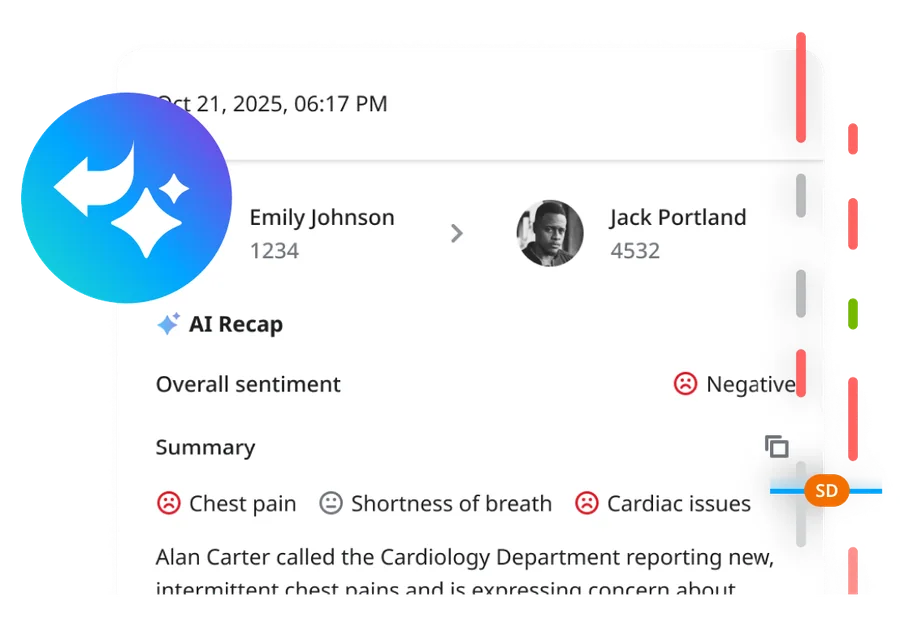
Generate a concise synopsis from a supported transcribed conversation.

Every customer call contains details your team may need later. Yet when employees are busy, writing complete notes after every conversation can be difficult. ELEVATE AI Interaction Summary helps eligible Contact Center teams review AI-generated summaries of recorded customer calls—giving supervisors useful context for follow-up, service improvement, and coaching. CloudBusinessPhone.com helps you evaluate whether the feature fits your workflows, understand the licensing and recording requirements, and put it to work responsibly.
See How AI Supports Your Service Team →
Useful call context. Less repetitive review. Human judgment where it matters.
AI Interaction Summary applies to supported, recorded and transcribed Contact Center voice calls. Availability and access depend on subscription, configuration, and permissions.
A customer calls about a delayed delivery. A representative listens, checks the details, explains the next step, and moves to the next caller. Later, a manager needs to understand what was promised. The conversation was recorded—but someone must find it, listen to it, or read a full transcript. If the representative's notes are brief or incomplete, that review can take longer than it should.
Customer conversations matter because they shape the next decision: whether someone needs a callback, whether a process should change, or whether an employee could benefit from coaching. But the information is often scattered between recordings, handwritten notes, and the recollections of busy people.
ELEVATE AI Interaction Summary helps bring the substance of an eligible recorded Contact Center call into a shorter, more usable format. Instead of beginning with the full recording every time, authorized supervisors can start with a generated overview, then return to the recording and transcript for details that require confirmation.
Generate a concise synopsis from a supported transcribed conversation.
Help supervisors identify the calls and details worth investigating further.
Use verified information to inform coaching, customer follow-up, and process improvements.
The summary is a reference tool. Important facts, promises, complaints, financial information, and regulated matters should be checked against the original interaction and appropriate records.
The situation: A handful of employees handle a meaningful number of customer calls each day. The owner or office manager sometimes needs to understand a previous conversation, but cannot listen to every recording.
What changes: Eligible AI-generated summaries give the manager a quicker starting point for reviewing what was discussed. The team can decide which conversations still require detailed listening or additional documentation.
Review Your Call Documentation Workflow →The situation: Team leads are balancing staffing, coaching, escalations, quality reviews, and ongoing call volume.
What changes: Summaries help managers review interaction context without treating a full recording as the only place to begin. This can make it easier to direct time toward conversations that warrant training or follow-up.
Discuss Team Review and Coaching →The situation: Some customer interactions involve several steps, later follow-up, or handoffs across departments. Missing context creates repeat questions and avoidable friction.
What changes: A properly configured Contact Center summary process can provide a useful review record for authorized staff. How—or whether—that context is automatically shown to the next representative must be verified in the deployed system.
Explore Better Customer Context →
A representative handles an eligible call in an ELEVATE Contact Center queue. Recording and transcription have been configured in accordance with business policy and applicable requirements.

The system generates a shorter synopsis from the call transcript. Like any AI-generated text, the result can contain mistakes or leave out nuance.

An authorized manager can review the summary alongside the linked recording, using the original conversation when accuracy is important.

A person decides whether to follow up with the customer, help an employee, correct a process, or simply close the issue. The AI does not independently approve customer commitments or certify compliance.
Illustrative sequence for appropriately enabled, recorded Contact Center voice calls. Exact interfaces, summary placement, storage, and access vary by ELEVATE configuration.
Hover or tap a card to see how it can help.
Challenge: A representative finishes a complex conversation and must reconstruct the highlights while the queue continues to fill.
An eligible call summary provides a draft overview of the conversation, allowing employees or supervisors with appropriate access to focus on checking and documenting the actions that matter rather than starting every recap from scratch.
Value: Less repetitive review work and a more consistent starting point for documenting interactions. Official case notes or required CRM fields may still need human completion.
Example: A home-services coordinator completes a customer call about a rescheduled repair and uses the authorized summary view to review the discussion before creating an accurate follow-up task.
Challenge: A manager receives an escalation and needs to understand the earlier conversation without searching through a lengthy call recording from beginning to end.
The summary associated with the recording gives the manager an initial view of the issue, reported outcome, and relevant points. The manager checks the recording before deciding how to address the complaint.
Value: More focused review of customer concerns, without assuming the AI summary settles disputed facts.
Example: A dealership service manager reviews a call concerning a repair estimate and then listens to the relevant recording segment to verify what the adviser actually said.
Challenge: Team leads know that customer conversations contain teaching moments, but reviewing every minute of every call is impractical.
Summaries can make recorded interactions easier to scan, giving supervisors a starting point for deciding which interactions deserve additional evaluation.
Value: More targeted coaching conversations grounded in real situations rather than memory alone.
Example: A retail support supervisor selects calls involving delivery problems, verifies the details, and uses the discussion to coach staff on explaining realistic next steps.
Challenge: A customer calls about a problem that cannot be resolved immediately. A supervisor or another employee later needs to understand which action was discussed.
A summary of the previous call can help an authorized person find relevant context, provided the workflow makes the record accessible. It is not a guarantee that the next incoming call will automatically display the prior summary.
Value: A clearer starting point for human follow-up and fewer avoidable gaps when a customer issue spans multiple interactions.
Example: An equipment platform provider's customer-service manager reviews a prior support-call summary before contacting the shipping department about a delayed replacement part.
Challenge: New employees need examples of how experienced representatives handle real customer questions, but raw recordings are time-consuming to review and may contain sensitive information.
With appropriate consent, access controls, and anonymization, supervisors can use summaries as an index for locating suitable training examples and then review the source recording to confirm the teaching points.
Value: Training that relates to actual customer concerns rather than generic scripts alone.
Example: A small contact center prepares a training discussion around several verified calls where employees explained a service appointment window clearly and professionally.
Challenge: Customers repeatedly call about similar issues, but information about those conversations is dispersed among individual notes and recordings.
Supervisors may review summaries to notice potential recurring themes and identify calls needing closer examination. This feature does not, by itself, establish an automatic cross-call analytics dashboard or trend-reporting capability. Separate Contact Center reporting, topic extraction, or analytics capabilities would need their own verification.
Value: A practical starting point for asking better operational questions and evaluating whether workflows need adjustment.
Example: A service business notices several verified calls about unclear pickup instructions and updates its confirmation process. The conclusion comes from human review of evidence, not an assumed AI trend report.
AI Interaction Summary is most relevant where a business has human employees taking customer calls in a Contact Center environment. It is not the same service as an AI Receptionist, which answers suitable inbound inquiries, or general business-phone Call Recap. CloudBusinessPhone.com should begin by understanding which conversations actually require a written record and who needs to access it.
Review how inbound queues and any outbound calling are managed; confirm actual ELEVATE subscriptions, call recording settings, transcription, summary enablement, authorized users, language coverage, and retention. Pilot with a small group of real business scenarios and safe test data.
If the business currently uses separate phone, customer-service, or reporting tools, examine whether ELEVATE Contact Center and relevant AI capabilities address a specific operational problem. A replacement or migration is not assumed; interoperability and commercial feasibility must be evaluated.
Where separately supported and licensed, combine the post-call summary process with AI Agent Assist for employee knowledge assistance, AI Supervisor Assist for live coaching visibility, and AI Agent Evaluator for structured quality reviews. Each has different prerequisites and purposes.
Discovery questions: Which calls are recorded? Who currently writes notes? How long does wrap-up take? Which supervisors review recordings? What privacy or retention policies apply? Are summaries needed for call coaching, formal case records, customer callbacks, or all three? What would qualify as a useful improvement after a pilot?
A summary feature can be impressive in a demo and still fail to solve a day-to-day problem if the right calls are not recorded, employees cannot find the summaries, or the team has no standard for checking important information.
CloudBusinessPhone.com brings experience in business telephony and real-world customer-service operations to the decision. Our job is to help you choose the right level of technology—not to convince you that every business needs every AI tool.
Our leadership team benefits from more than 30 years of relevant business phone experience among its leadership and team. We help connect the technology decision with the people and processes that make it useful.
Our promise: Honest guidance that consults and solves, not sells.
 FAQs \u00b7 PDF
Downloadable faq and practical resource: FAQ - AI Call Recap.
Read the FAQs Datasheet \u00b7 PDF · free download
Downloadable datasheet and practical resource: Datasheet - AI Call Recap.

Learn your goals, team, and current communications setup.

Confirm the right ELEVATE approach for your business.

Plan your call flows, AI support, and team experience.

Set up, configure, and get everything ready to go live.

Train your team and help everyone get comfortable quickly.

Review results, make adjustments, and keep optimizing for better outcomes.

Your employees should be able to concentrate on customers, and your supervisors should have a practical way to review what happened. ELEVATE AI Interaction Summary can help eligible Contact Center teams shorten the path from a recorded conversation to useful context. CloudBusinessPhone.com will help you determine whether it fits your environment and how to implement it responsibly. Straight answers about what the technology can do, what it requires, and whether it is worth adding to your business.
For eligible recorded Contact Center interactions, the feature can produce a concise account of what was discussed, helping authorized staff understand the issue and possible follow-up without listening to an entire recording. The exact output, availability, and retention are governed by the selected service. A summary is an aid to review, not a legally authoritative transcript or a substitute for the underlying recording.
No. Both may reduce the time spent reviewing conversations, but they belong to different product workflows. AI Call Recap is associated with eligible business-calling functionality, while AI Interaction Summary is a Contact Center feature. Confirm which employees need access to which kinds of records before choosing a product.
Not as a standard capability. Showing a caller's earlier summary to the next agent depends on the current release status, your queue entitlement and the exact agent experience, so we confirm those before presenting it as part of your solution.
That is why important decisions and customer commitments should still be checked against the recorded interaction or other authoritative records. Teams should know when a summary may be used as context and when a supervisor must review the source. Access, recording consent, retention, and privacy settings also matter.
Every customer call contains details your team may need later. Yet when employees are busy, writing complete notes after every conversation can be difficult. ELEVATE AI Interaction Summary helps eligible Contact Center teams review AI-generated summaries of recorded customer calls—giving supervisors useful context for follow-up, service improvement, and coaching. CloudBusinessPhone.com helps you evaluate whether the feature fits your workflows, understand the licensing and recording requirements, and put it to work responsibly.
Related topics: Reduce Repetitive After-Call Write-Ups, Help Supervisors Review Customer Complaints, Identify Useful Coaching Examples, Support Follow-Up on Multi-Step Service Issues